Silvercrest SWEP 500 A1 Uživatelský manuál
Procházejte online nebo si stáhněte Uživatelský manuál pro Rádio Silvercrest SWEP 500 A1. Silvercrest SWEP 500 A1 User Manual Uživatelská příručka
- Strana / 131
- Tabulka s obsahem
- KNIHY

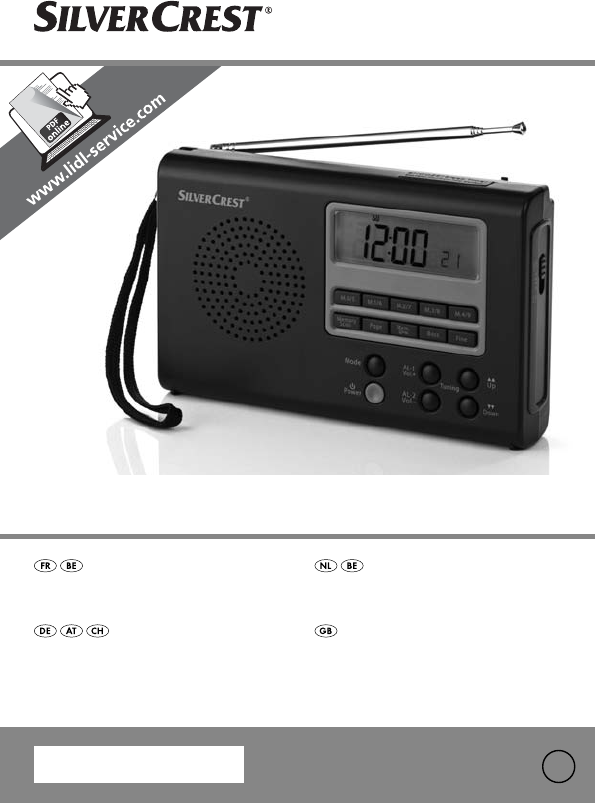
- IAN 79840 1
- SOMMAIRE PAGE 4
- Utilisation conforme 5
- Caractéristiques techniques 5
- Gammes de fréquences radio : 6
- Symboles utilisés 7
- Consignes de sécurité 8
- Danger d’électrocution 9
- Danger d’incendie ! 9
- Risque de blessure 10
- Orages ! 10
- Attention ! 11
- Mise en service 13
- Raccordement au secteur 14
- Connexion du casque 14
- Principales fonctionnalités 15
- Fonctions de temps 16
- Réglage du fuseau horaire 18
- Affichage du temps universel 20
- Remarque : 21
- Choix du mode d’affichage 22
- Chronomètre 25
- Compte à rebours 26
- Fonctionnement de la radio 27
- Réglage de la station 28
- Ajustement fin 29
- Fonctions de mémoire 30
- Nettoyage 32
- Mise au rebut 33
- Importateur 33
- INHOUDSOPGAVE PAGINA 36
- Inleiding 37
- Technische gegevens 37
- Batterijen 38
- Zenderbanden (NORMAL/FINE): 38
- Gebruikte symbolen 39
- Veiligheidsvoorschriften 40
- Brandgevaar! 41
- Gevaar op letsel 42
- Opgelet! 43
- Bediening 44
- Inbedrijfstelling 45
- Netaansluiting 46
- 6V 600 mA-aans 46
- Koptelefoon aansluiten 46
- Algemene functies 47
- Tijdfuncties 47
- Tijdzone instellen 50
- Wereldtijd weergeven 52
- Zomer-tijdsverschil 52
- Aanwijzing: 53
- Weergavemodus kiezen 54
- Wekfunctie 54
- Chronometerfunctie 57
- Aftelfunctie 58
- Werking van de radio 59
- Zender instellen 60
- Zenders fijn afstemmen 61
- Opslagfuncties 62
- Reiniging 64
- Afvoeren 64
- Importeur 65
- Garantie & service 65
- INHALTSVERZEICHNIS SEITE 68
- Einführung 69
- Bestimmungsgemäße Verwendung 69
- Technische Daten 69
- DE/AT/CH 70
- Verwendete Symbole 71
- Sicherheitshinweise 72
- Bedienelemente 76
- Inbetriebnahme 77
- Allgemeine Funktionen 79
- Zeitfunktionen 79
- Radiobetrieb 91
- Reinigung 96
- Entsorgen 96
- Garantie und Service 97
- CONTENTS PAGE 100
- Introduction 101
- Intended use 101
- Technical Data 101
- Tuning ranges (NORMAL/FINE): 102
- Batteries 102
- Frequency range radio: 102
- Symbols used 103
- Safety information 104
- Risk of electric shock! 105
- Risk of fire! 105
- Risk of injury 106
- Thunder storms! 106
- Notes on handling batteries 107
- Caution! 107
- Operating elements 108
- Starting up 109
- Mains connection 110
- 6V 600 mA socket on 110
- Connecting headphones 110
- General functions 111
- Time functions 111
- Day of the week indication: 113
- Setting the time zone 114
- Summer time 115
- Show world time 116
- Summer Time Offset 116
- Select display mode 118
- Alarm function 118
- Stop watch function 121
- Countdown function 122
- Radio operation 123
- Setting the station 124
- Fine tuning 125
- Memory functions 126
- Cleaning 128
- Disposal 128
- Importer 129
- Warranty & Service 129
Shrnutí obsahu
RÉCEPTEUR RADIO UNIVERSEL SWEP 500 A1 WELTEMPFÄNGERBedienungsanleitung WERELDONTVANGERGebruiksaanwijzing RÉCEPTEUR RADIO UNIVERSELMode d’emploi2I
• Ne jamais recouvrir les fentes d’aération de l’appareil lorsque celui-ciest sous tension.• Ne pas utiliser l’appareil à proximité d’une flamme incan
- 97 -GBCONTENTS PAGEIntroduction 98Intended use 98Technical Data 98Symbols used 100Safety information 101Operating elements 105Starting up 106Genera
IntroductionCongratulations on the purchase of your new appliance. You have clearlydecided in favour of a quality product. These operating instruction
Power consumption: 5 wattsPower consumption Standby: approx. 1 WOperating temperature: +5 ~+40°CHumidity: 5 ~80% (no condensation)Dimensions (W x H x
GeneralMemory positions: 400HeadphonesModel: E105Impedance: 32 Ω Wideband characteristic Voltage (WBCV): approx. 110 mVHeadphone socketmax. Output vol
This symbol warns about submersing the appliance in water or other liquids.This symbol warns you about hearing damage.Note:With this symbol you are gi
Risk of electric shock!• Connect the mains-power adapter only to correctly installed and earthed mains sockets. Ensure that the rating of the local po
• Never cover the device’s ventilation slots when it is switched on.• Do not place open flames, such as candles, on or near the device.Risk of injury•
Information on separating the device from mains powerThe POWER button on this device does not completely separate it fromthe mains network. In additio
Operating elementsFig. A Front panelqSave buttons M.0/5 - M.4/9wDisplayeButton SNOOZE/SLEEP TIMERrWaveband selector switch (LW/SW/MW/FM)tBASS buttonyF
Starting upUnpack the deviceRemove all packaging materials.Caution!Do not let children play with the plastic film. There is a risk of suffocation.Chec
Remarque relative à la mise hors tensionLa touche POWER ne permet pas d’isoler complètement l’appareil del’alimentation électrique. De plus, l’apparei
• Replace the cover on the battery compartment.If the batteries become too weak, this is indicated by the symbol blinking in the display. Subsequently
General functionsKey lockIn order to prevent changing the settings unintentionally by touching thebuttons, you can activate the key lock.• With the ra
Time, date, time zone and world timeYou can set the time, date and time zone via the MODE button. You can con-tinue to query and adjust the universal
Setting clock time• Press MODE once. The most recently set time flashes on the screen.• Press the UP or DOWN button to move the time forward or backwa
Setting the time zone• Press MODE again or three times. The selected time zone flashes on thescreen as the abbreviation for the corresponding city (UT
Short code Difference from CETSummer timeTownHNL -10:00noHonolulu/USAANC -9:00yesAnchorage/USAYVR -8:00yesVancouver/CanadaLAX -8:00yesLos Angeles/USAD
*UTCUniversal Time Coordinated (UTC). UTC is the reference for the times of thevarious time zones around the world.Show world time• Press MODE again o
Special date alarm• Press the MODE button a fifth time to set the special date alarm. The screen flashes SDA1 and the date in succession.• Press the P
Select display modeYou can select which information is shown on the screen when the radio isswitched off.The selected mode is indicated by a correspon
Setting the alarm timeYou can set two alarm times in your world receiver.• With the radio switched off, press the buttons Vol.+/AL–1 (or Vol.-/AL–2).T
RéglageFig. A AvantqTouches mémoire M.0/5 - M.4/9wEcraneTouche SNOOZE/SLEEP TIMERrSélecteur de fréquences (LW/SW/MW/FM)tTouche BASSyTouche FINEuTouche
• Press the SNOOZE button to set the desired week day.To go back to selecting week days, weekend or every day, briefly holddown the SNOOZE button agai
Set snooze time• With the radio switched off, press the button MODE seven times. The screen displays the snooze time set (default is SNO 10).• Use the
Countdown functionThe countdown function is only available when the radio is switched off.Set and save countdown• Press and hold down the MEMORY SCAN
Radio operationSwitching on / volume control• Press the POWER button to switch the radio on. ON will appear briefly onthe screen, followed by the curr
Sleep functionYou can activate the sleep function via the SNOOZE button. You can set atime of up to 90 minutes in ten-minute steps, after which the ra
Fine tuningIf a station can not be found precisely the fine tuning can be use to improvereception.• During the channel search press the FINE button, t
Memory functionsSave stationThe world receiver can save 400 radio stations.To store a station, proceed as follows:• Set the frequency range with the f
Selecting a saved station• In order to select a saved station directly, first use the frequency selectionswitch to select the frequency range where th
CleaningRisk of injury from electric shock:• Disconnect the device from the mains power before cleaning it!• Never immerse the device’s parts into wat
Disposal of batteriesBatteries must not be disposed in the household rubbish. Each consumer isobliged by law to bring batteries/rechargeable batteries
Mise en serviceDéballage de l’appareilSortir l’appareil de son emballage.Attention !Ne pas laisser les enfants jouer avec l’emballage. Ils risqueraien
The warranty covers only claims for material and manufacturing defects,but not for transport damage, for wearing parts or for damage to fragilecompone
2IAN 79840KOMPERNASS GMBHBURGSTRASSE 2144867 BOCHUMGERMANYwww.kompernass.comVersion des informations · Stand van de informatieStand der Informationen
• Insérer les quatre piles en prenant soin de respecter la polarité indi-quée dans le compartiment.• Remettre le couvercle en place.Lorsque les piles
Attention ! A pleine puissance, l’écoute prolongée du baladeur peut endommager l’oreille de l’utilisateur.Les articles 44.5 et 44.6 du code de la sant
Fonctions de tempsLorsque l’alimentation est tension est établi (opération sur secteur ou sur piles),l’affichage de l’heure sur le récepteur universel
Réglage de l’heure• Appuyer une fois sur le bouton MODE. L’heure réglée au préalable clignote à l’écran.• Appuyer au besoin sur les boutons UP et DOWN
Réglage du fuseau horaire• Appuyer une nouvelle fois sur le bouton MODE (soit trois fois au total). Le fu-seau horaire actuel s’affiche à l’écran pour
Abréviation Décalage CET Heure d'été VilleHNL -10:00nonHonolulu/USAANC -9:00ouiAnchorage/USAYVR -8:00ouiVancouver/CanadaLAX -8:00ouiLos Angeles/U
FR / BE Mode d’emploi Page 1NL / BE Gebruiksaanwijzing Pagina 33DE / AT / CH Bedienungsanleitung Seite 65GB Operating instructions Page 97
*UTCUniversal Time Coordinated (temps universel coordonné). Le tempsuniversel coordonné représente l’heure de référence en fonction de laquelle est dé
Alarme de rappel de date• Appuyer une cinquième fois sur le bouton MODE pour configurer unealarme de rappel de date. Le message SDA1 et la date cligno
Choix du mode d’affichageL’appareil permet de sélectionner les données à afficher lorsque la radioest éteinte. Le mode sélectionné est indiqué par un
Réglage du réveilLe récepteur mondial permet la programmation de deux alarmes différentes.• Lorsque la radio est éteinte, appuyez sur la touche Vol.+/
• Appuyer sur le bouton SNOOZE pour sélectionner le jour souhaité.Pour revenir aux autres options (jours de semaine, week-end ou tous lesjours), appuy
Réglage de l’arrêt temporaire de l’alarme• Lorsque la radio est éteinte, appuyez sept fois sur la touche MODE.L’écran affiche la durée de l’arrêt temp
Compte à reboursLe mode compte à rebours est uniquement disponible lorsque la radio est éteinte.Réglage et mise en mémoire du compte à rebours• Appuye
Fonctionnement de la radioMise sous tension/volume• Appuyer sur la touche POWER pour allumer la radio. L’indication ONapparaît brièvement à l’écran, i
Fonction sommeilLe bouton SNOOZE permet également d’activer la fonction sommeil. Grâce àcette fonction, la radio s’éteint automatiquement au bout d’un
Réglage de la gamme de fréquences MWLes systèmes d’émission radio différant d’un pays à l’autre, un réglage de lagamme de fréquences s’impose :• Lorsq
AB
Le sélecteur SW SEN. sur le côté gauche de l’appareil permet d’améliorer laqualité de réception des signaux dans la gamme de fréquences SW. Sélectionn
Remarque :Si l’appareil est alimenté par le secteur exclusivement (aucune pile n’aété insérée), les stations mises en mémoire seront perdues en cas de
Accéder aux emplacements-mémoires• Appuyer sur le bouton MEMORY SCAN afin de confirmer la mise en mémoire de toutes les stations de la bande de fréque
Mise au rebutMise au rebut de l’appareilL’appareil ne doit pas être jeté avec les ordures ménagères. Il doit être mis au rebut par l’intermédiaire d’u
Garantie & service après-venteCet appareil bénéficie de 3 ans de garantie à compter de la date d'achat.L'appareil a été fabriqué avec so
- 32 -IB_79840_SWEP500A1_LB2 04.01.2013 10:48 Uhr Seite 32
- 33 -NL/BEINHOUDSOPGAVE PAGINAInleiding 34Gebruik in overeenstemming met bestemming 34Technische gegevens 34Gebruikte symbolen 36Veiligheidsvoorschr
InleidingGefeliciteerd met de aankoop van uw nieuwe apparaat. U hebt hiermee gekozen voor een hoogwaardig product. De bedieningshandleidingmaakt deel
Verbruik: 5 WattVerbruik in stand-by: ca. 1 WGebruikstemperatuur: +5 ~+40°CLuchtvochtigheid: 5 ~80 % (geen condensatie)Afmetingen (B x H x D): 17,7 x
AlgemeenGeheugenposities: 400HoofdtelefoonModel: E105Impedantie: 32 Ω Breedband- signaalspanning (WBCV): ca. 110 mVHoofdtelefoonuitgang maximale uitga
- 1 -FR/BESOMMAIRE PAGEIntroduction 2Utilisation conforme 2Caractéristiques techniques 2Symboles utilisés 4Consignes de sécurité 5Réglage 9Mise en se
Dit symbool waarschuwt voor het onderdompelen van het apparaatin water of andere vloeistoffen.Dit symbool waarschuwt u voor gehoorschade.Opmerking: bi
Gevaar voor elektrische schokken!• Sluit de stekkeradapter uitsluitend aan op een volgens de voorschriftengeïnstalleerd en geaard stopcontact. De nets
• Dek de ventilatieopeningen van het apparaat nooit af als het is ingeschakeld.• Plaats nooit open vlammen, zoals kaarsen, op of naast het apparaat.Ge
Aanwijzing voor het afkoppelen van de voedingDe POWER-knop van het apparaat koppelt het apparaat niet helemaalaf van het elektriciteitsnet. Bovendien
BedieningAfb. A VoorzijdeqGeheugentoetsen M.0/5 - M.4/9wDisplayeToets SNOOZE/SLEEP TIMERrBandkeuzeknop (LW/SW/MW/FM)tToets BASSyToets FINE uToetsen UP
InbedrijfstellingApparaat uitpakkenVerwijder al het verpakkingsmateriaal.Opgelet!Laat kleine kinderen niet met folie spelen. Er bestaat gevaar op vers
• Schuif het deksel van het batterijvak weer op het vak.Worden de batterijen te zwak, dan wordt dit aangegeven op het displaydoor het knipperende symb
Algemene functiesToetsvergrendelingU kunt verhinderen dat de instellingen door onopzettelijke aanrakingenvan de toetsen worden gewijzigd door de toets
Tijd, datum, tijdzone en wereldtijdMet de MODE-toets kunt u het uur, de datum en de tijdzone instellen. Verder kunt u het volgende instellen en opvrag
- 46 -NL/BETijd instellen• Druk eenmaal op MODE. Op het scherm wordt de laatst ingestelde tijdknipperend weergegeven.• Druk op de toetsen UP of DOWN o
IntroductionToutes nos félicitations pour l'achat de votre nouvel appareil. Vous avezchoisi un produit de grande qualité. Le mode d'emploi f
Tijdzone instellen• Druk nogmaals (resp. driemaal) op MODE. Op het scherm knippert deingestelde tijdzone als afkorting voor de bijbehorende stad (bij
Afkorting Verschil met CET Zomertijd PlaatsHNL -10:00neeHonolulu/VSANC -9:00jaAnchorage/VSYVR -8:00jaVancouver/CanadaLAX -8:00jaLos Angeles/VSDEN -7:0
*UTCUniversal Time Coordinated (nl.: gecoördineerde wereldtijd). De UTC isde referentietijd waarvan de tijden in de verschillende tijdzones vande were
Speciaal datumalarm• Druk een vijfde maal op de MODE-toets om het speciale datumalarm inte stellen. Op het scherm worden afwisselend SDA1 en de datumk
Weergavemodus kiezenU kunt kiezen welke gegevens op het scherm worden weergegeven als deradio is uitgeschakeld.De respectievelijke modus wordt met ove
Wektijd instellenU kunt uw wereldontvanger op twee wektijden instellen.• Druk op de toets Vol.+/AL–1 (of Vol.-/AL–2) terwijl de radio uitgeschakeldis.
• Druk op de SNOOZE-toets om de gewenste dag van de week in te stellen.U kunt terugkeren naar de keuze tussen werkdagen, het weekend of eenhele week d
Wekonderbreking instellen• Druk 7x op de toets MODE terwijl de radio is uitgeschakeld. Op hetscherm wordt de ingestelde wekonderbreking (bij eerste ge
AftelfunctieDe aftelfunctie is alleen beschikbaar als de radio is uitgeschakeld.Aftellen instellen en bewaren• Houd daarvoor de MEMORY SCAN-toets een
Werking van de radioInschakelen/volume• Druk op de POWER-toets om de radio in te schakelen. Op het schermwordt even ON weergegeven, waarna de momentee
Puissance absorbée : 5 WattPuissance absorbée en veille : env. 1 WTempérature de fonctionnement : +5 ~+40°CHumidité relative : 5 ~80 % (sans condensat
SluimerfunctieVia de SNOOZE-toets kunt u ook de sluimerfunctie activeren. U kunt een tijdtot 90 minuten instellen in stappen van tien minuten, waarna
Zenders fijn afstemmenAls een zender niet exact kan worden gevonden, kan de ontvangst met fijnafstemmen mogelijk worden verbeterd.• Druk, terwijl u ze
OpslagfunctiesZenders opslaanDe wereldontvanger kan 400 zenders opslaan.Als u een zender wilt opslaan, doet u het volgende:• Stel met de bandkeuzescha
Opgeslagen zenders selecteren• Om rechtstreeks een opgeslagen zender te kiezen, stelt u met debandkeuzeschakelaar eerst de frequentieband in waarin de
ReinigingLevensgevaar door elektrische schokken:• Trek de stroomstekker van het apparaat uit voordat u het reinigt!• Dompel het apparaat nooit onder i
Afvoeren van batterijen / accu’sBatterijen mogen niet in het huisvuil belanden. Elke consument is wettelijk verplicht om batterijen / accu’s in te lev
De garantie geldt alleen voor materiaal- of fabricagefouten, echter nietvoor transportschade, of voor onderdelen die aan slijtage onderhevig zijn,of v
- 64 -IB_79840_SWEP500A1_LB2 04.01.2013 10:48 Uhr Seite 64
DE/AT/CHINHALTSVERZEICHNIS SEITEEinführung 66Bestimmungsgemäße Verwendung 66Technische Daten 66Verwendete Symbole 68Sicherheitshinweise 69Bedieneleme
EinführungHerzlichen Glückwunsch zum Kauf Ihres neuen Gerätes. Sie haben sichdamit für ein hochwertiges Produkt entschieden. Die Bedienungsanleitungis
Caractéristiques généralesEmplacements mémoire : 400EcouteursModèle : E105Impédance : 32 Ω Tension d'identification à large bande (WBCV) : env. 1
Leistungsaufnahme: 5 WattLeistungsaufnahme Standby: ca. 1 WBetriebstemperatur: +5 ~+40°CFeuchtigkeit: 5 ~80 % (keine Kondensation)Abmessungen (B x H x
AllgemeinSpeicherplätze: 400 KopfhörerModell: E105Impedanz: 32 Ω Breitband-Kennungsspannung (WBCV): ca. 110 mVKopfhörerausgangmaximale Ausgangsspannun
Dieses Symbol warnt vor dem Eintauchen des Gerätes in Wasseroder andere Flüssigkeiten.Dieses Symbol warnt Sie vor Gehörschäden.Hinweis: Bei diesem Sym
Gefahr durch elektrischen Schlag!• Schließen Sie das Steckernetzteil nur an eine vorschriftsmäßiginstallierte und geerdete Netzsteckdose an. Die Netzs
• Decken Sie niemals die Lüftungsschlitze des Gerätes ab, wenn es eingeschaltet ist.• Stellen Sie keine offenen Brandquellen, wie z. B. Kerzen auf ode
Hinweis zur NetztrennungDie Taste POWER dieses Gerätes trennt das Gerät nicht vollständig vomStromnetz. Außerdem nimmt das Gerät im Standby-Betrieb St
BedienelementeAbb. A VorderseiteqSpeichertasten M.0/5 - M.4/9wDisplayeTaste SNOOZE/SLEEP TIMERrBandwahlschalter (LW/SW/MW/FM)tTaste BASS yTaste FINEuT
InbetriebnahmeGerät auspackenEntfernen Sie sämtliches Verpackungsmaterial.Achtung!Lassen Sie kleine Kinder nicht mit Folie spielen. Es besteht Erstick
• Schieben Sie den Deckel wieder auf das Fach.Werden die Batterien zu schwach, so wird dies im Display durch das blin-kende Symbol angezeigt. Anschli
Allgemeine FunktionenTastensperreUm zu verhindern, dass durch unabsichtliches Berühren der Tasten Einstel-lungen geändert werden, können Sie eine Tast
Ce symbole met en garde contre la plongée de l'appareil dans l'eauou dans d'autres liquides.Ce symbole vous avertit du risque de dommag
Uhrzeit, Datum, Zeitzone und WeltzeitSie können über die Taste MODE Uhrzeit, Datum und Zeitzone einstellen.Weiterhin können Sie die Weltzeit, den Datu
Uhrzeit einstellen• Drücken Sie einmal MODE. Im Display blinkt die zuletzt eingestellte Uhrzeit.• Drücken Sie die Taste UP bzw. DOWN, um die Uhrzeit i
Zeitzone einstellen• Drücken Sie ein weiteres Mal bzw. dreimal MODE. Im Display blinkt dieeingestellte Zeitzone als Kürzel für die zugehörige Stadt (b
Kürzel Diff. z. MEZ Sommerzeit StadtHNL -10:00neinHonolulu/USAANC -9:00jaAnchorage/USAYVR -8:00jaVancouver/KanadaLAX -8:00jaLos Angeles/USADEN -7:00ja
*UTCUniversal Time Coordinated (dt.: koordinierte Weltzeit). Die UTC ist die Referenzzeit, von der die Zeiten in den verschiedenen Zeitzonen der Erdea
Spezieller Datumsalarm• Drücken Sie die Taste MODE ein fünftes Mal, um den speziellen Datums-alarm einzustellen. Im Display blinken abwechselnd die An
Anzeigemodus wählenSie können wählen, welche Daten im Display angezeigt werden, wenn dasRadio ausgeschaltet ist.Der entsprechende Modus wird über ents
Weckzeit einstellenSie können mit Ihrem Weltempfänger zwei Weckzeiten programmieren.• Drücken Sie bei ausgeschaltetem Radio die Taste Vol.+/AL–1(oder
• Drücken Sie die Taste SNOOZE, um den gewünschten Wochentag einzu-stellen.Um wieder zurück zur Auswahl von Werktagen, Wochenende oder ganzerWoche zu
Weckunterbrechung einstellen• Drücken Sie bei ausgeschaltetem Radio 7x die Taste MODE. Im Display erscheint die eingestellte Weckunterbrechung (bei de
Danger d’électrocution• Branchez le bloc d'alimentation réseau exclusivement à une prise decourant réseau installée et mise à la terre en bonne e
Countdown-FunktionDie Countdown-Funktion steht nur bei ausgeschaltetem Radio zur Verfügung.Countdown einstellen und speichern• Drücken und halten Sie
RadiobetriebEinschalten/Lautstärke• Drücken Sie die Taste POWER, um das Radio einzuschalten. Im Displaywird kurz ON eingeblendet, anschließend erschei
SchlummerfunktionÜber die Taste SNOOZE können Sie auch die Schlummerfunktion aktivieren.Sie können eine Zeit bis zu 90 Minuten in Zehn-Minuten-Schritt
SenderfeinabstimmungWenn ein Sender nicht genau gefunden werden kann, ist es möglich, durcheine Feinabstimmung den Empfang zu verbessern.• Drücken Sie
SpeicherfunktionenSender speichernDer Weltempfänger kann 400 Sender speichern.Um einen Sender zu speichern gehen Sie wie folgt vor:• Stellen Sie mit d
Gespeicherten Sender auswählen• Um einen gespeicherten Sender direkt auszuwählen, stellen Sie zunächst mit dem Bandwahlschalter das Frequenzband ein,
DE/AT/CHReinigungLebensgefahr durch elektrischen Schlag:• Trennen Sie das Gerät vom Stromnetz, bevor Sie es reinigen!• Tauchen Sie die Geräteteile nie
Batterien / Akkus entsorgenBatterien dürfen nicht im Hausmüll entsorgt werden. Jeder Verbraucher ist gesetzlich verpflichtet, Batterien /Akkus bei ein
aber für Transportschäden, Verschleißteile oder für Beschädigungen anzerbrechlichen Teilen, z. B. Schalter oder Akkus. Das Produkt ist lediglichfür de
- 96 -IB_79840_SWEP500A1_LB2 04.01.2013 10:48 Uhr Seite 96
Další dokumenty pro Rádio Silvercrest SWEP 500 A1

Související produkty a manuály pro Rádio Silvercrest SWEP 500 A1


 (140 stránky)

 (174 stránky)
 (30 stránky)
(41 stránky)
(43 stránky)
(126 stránky)
(76 stránky)
(74 stránky)
(74 stránky)
(76 stránky)
(58 stránky)
(56 stránky)
(72 stránky)
(36 stránky)
(68 stránky)
(160 stránky)
(52 stránky)
(84 stránky)
(80 stránky)
(158 stránky)
(30 stránky)
(41 stránky)
(43 stránky)
(126 stránky)
(76 stránky)
(74 stránky)
(74 stránky)
(76 stránky)
(58 stránky)
(56 stránky)
(72 stránky)
(36 stránky)
(68 stránky)
(160 stránky)
(52 stránky)
(84 stránky)
(80 stránky)
(158 stránky)
© 2020, manymanuals.cz. Všechna práva vyhrazena. | 0.052 s |
 Manymanuals.com
 Manymanuals.de
 Manymanuals.fr
 Manymanuals.it
 Manymanuals.pl
 Manymanuals.cz
 Manymanuals.es
 Manymanuals-pt.com
Komentáře k této Příručce